VRChat supports Windows, Android, and iOS (in beta), but unfortunately, it doesn’t support macOS. I only had a Mac on hand that day, but I wanted to join an event. That’s where NVIDIA GeForce NOW comes in!
GeForce NOW is a gaming-focused remote desktop service that allows you to connect to a Windows PC with games like VRChat set up and enjoy the game from your web browser or dedicated app.
I’ll be joining in the Japanese Sign Language (JSL) learning event.
The process is simple: sign in to GeForce NOW using your NVIDIA account via ⬇️ I’m currently using the free plan, so there will be a waiting list, so I patiently wait. There were just under 50 people waiting that day.
When it’s my turn, I connect to the PC environment provided by GeForce NOW, and VRChat will launch in desktop mode, followed by Steam. Once you sign in to VRChat, you’ll find yourself in the familiar VRChat world. Your avatar will appear in your home world, so simply play as usual. You’ll also need to sign in to the Steam app the first time you use it.
GeForce NOW
https://www.nvidia.com/en-us/geforce-now/
The free plan has a time limit and automatically stops after one hour. However, since the event I wanted to joined was only one hour long, I joined just before it started and continued attending until the group photo at the end of the event!
Please note that since it’s a remote desktop, there’s no way to transfer photos taken in VRChat to your local computer. Therefore, I use the photo by the instructor, Ayappii.
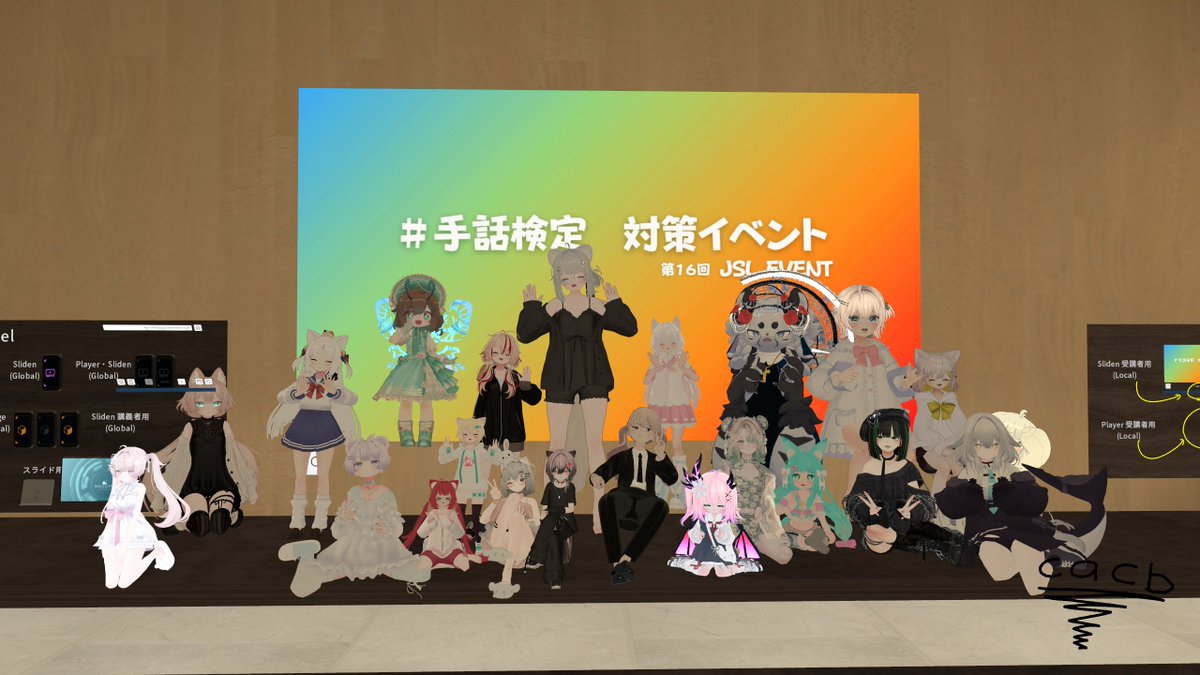 Photo by Ayappii
Now you can join in VRChat events even if you only have a Mac! ✨
You can find the link for the JSL group “VRC手話ポータル こねくと” ⬇️
https://vrchat.com/home/group/grp_55712cfd-77ab-464f-8174-1483616c0c89
You’ll also find photos about events if you search for “#手話検定対策イベント #VRC手話べりの集い” on X!